
Credlo AI Lead Hunter: Building an AI-Powered Loan Lead Generation & Management System Using n8n
Finance. Made simple. | An AI-powered automation initiative by Credlo
In today’s competitive business finance industry, generating customer enquiries is not enough. Businesses also need an efficient way to collect customer information, identify genuine funding requirements, avoid duplicate enquiries, prioritise potential customers, and manage timely follow-ups.
At Credlo, we developed Credlo AI Lead Hunter, an AI-assisted loan lead generation and management system using n8n, OpenAI, Google Sheets, and Gmail.
The objective was simple: build a practical automation solution that helps business finance professionals manage customer enquiries more systematically without initially investing in an expensive CRM platform.
The system brings together four important automation modules:
- Credlo Simple AI Chat
- Credlo Duplicate Lead Detection
- Credlo HOT Lead Alert
- Credlo Follow-up Reminder
These modules cover different stages of the lead management process, from the first customer conversation to internal email notifications and follow-up reminders.
This article explains how the system was developed, how its components work, and how businesses can implement a similar automation architecture.
1. Project Overview: What Is Credlo AI Lead Hunter?
Credlo AI Lead Hunter is an AI-assisted lead collection and management system designed for business finance and loan advisory operations.
It uses a conversational AI assistant to understand customer funding requirements and collect relevant business information.
Once the required information is collected, the system checks for an existing lead using the customer’s mobile number. After successful validation and customer consent, the new enquiry can be recorded in Google Sheets.
The lead is classified into one of three categories:
- HOT
- WARM
- COLD
Separate automation workflows help notify the Credlo team about new HOT leads and remind them about due or overdue follow-ups.
Project objectives
- Automate initial customer enquiry collection.
- Support Hindi, English, and Hinglish conversations.
- Reduce repetitive manual data entry.
- Detect duplicate leads using mobile numbers.
- Categorise customer enquiries by sales priority.
- Send email alerts for new HOT leads.
- Automate daily follow-up reminders.
- Maintain a centralised Google Sheets database.
The system is designed to support the sales team, not replace human loan advisors or make lending decisions.
2. Technology Stack
The project uses the following technologies:
| Technology | Implementation |
|---|---|
| n8n Cloud | Workflow automation |
| OpenAI GPT-4o-mini | Conversational AI |
| Google Sheets | Central lead database |
| Gmail | Internal email notifications |
| n8n AI Agent | Conversation and lead collection logic |
| Simple Conversation Memory | Recent conversation context |
Why n8n?
n8n provides a visual workflow automation environment where different applications and services can be connected through nodes.
Instead of building every integration from scratch, we can use existing nodes to connect AI models, spreadsheets, and email services.
This makes it possible to build modular automation systems that can be tested and improved independently.
3. Overall Workflow Architecture
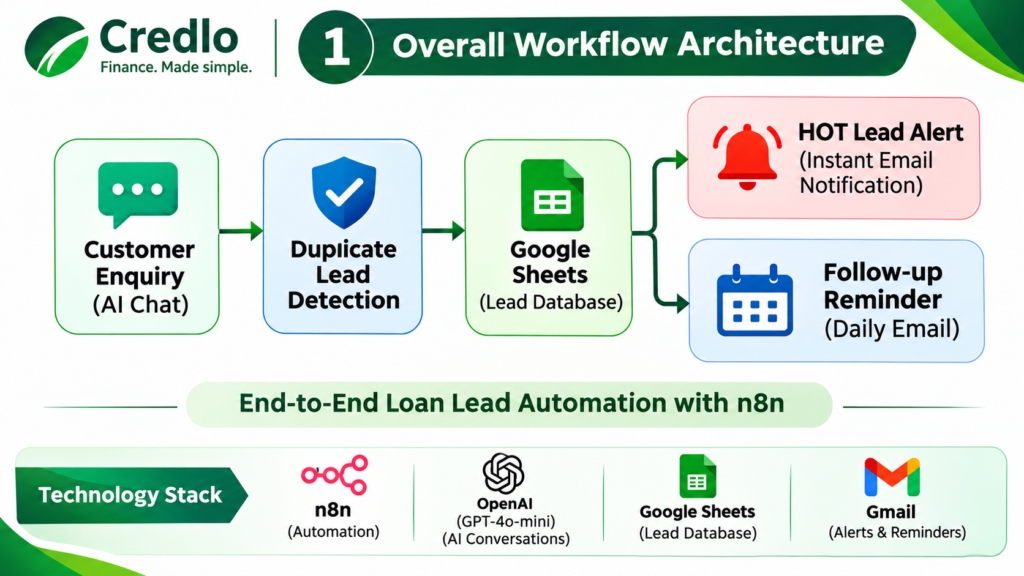
The Credlo AI Lead Hunter architecture consists of four functional modules connected through a common Google Sheets database.
How the system works
Customer Enquiry → AI Chat → Duplicate Check → Customer Consent → Google Sheets → Lead Classification → HOT Lead Alert → Follow-up Reminder
The process has four major stages:
Stage 1 – Customer interaction
The AI assistant communicates with potential customers and collects their business finance requirements.
Stage 2 – Lead validation
The assistant checks the customer’s mobile number against existing Google Sheets records before saving a new enquiry.
Stage 3 – Lead prioritisation
The lead receives a HOT, WARM, or COLD category. A separate workflow checks newly added records and sends an email notification for HOT leads.
Stage 4 – Follow-up management
A scheduled workflow checks the Next Follow-up Date field and sends reminders for leads due for follow-up.
4. Module One: Credlo Simple AI Chat
Intelligent customer enquiry collection
The first module is the customer-facing AI assistant.
It is designed to understand customer requirements naturally rather than forcing customers to complete a lengthy enquiry form.
The assistant uses n8n’s Chat Trigger and AI Agent.
Actual workflow components
- When Chat Message Received
- Credlo AI Chat Agent
- OpenAI Chat Model
- Simple Conversation Memory
- Google Sheets Append Row tool
- Google Sheets Get Row(s) tool
The OpenAI Chat Model is configured to use GPT-4o-mini.
The conversation memory uses a session-specific key and maintains a window of 10 messages.
Conversation capabilities
The assistant is configured to:
- Respond in Hindi, English, and Hinglish.
- Greet customers by their names.
- Ask one relevant question at a time.
- Remember information already shared in the conversation.
- Understand business funding requirements.
- Explain relevant Credlo services.
- Collect missing information without guessing.
Credlo business finance services
The assistant is configured with information about:
- Working Capital Finance
- Loan Against Property (LAP)
- Machinery Loans
- Bill Discounting
- Private Funding Solutions
It also understands three business constitutions:
- Proprietorship
- Partnership
- Private Limited Company
Lead information collection
The AI assistant is configured to collect:
| Information | Purpose |
|---|---|
| Customer Name | Identify the customer |
| Business Name | Identify the business |
| Constitution | Understand business structure |
| Mobile Number | Customer identification and duplicate check |
| City and State | Business location |
| Industry | Business sector |
| Loan Amount | Funding requirement |
| Loan Purpose | Purpose of financing |
| Callback Time | Preferred contact time |
| Email Address | Contact information |
Additional fields include annual turnover, existing loan details, contact consent, and lead category.
Customer consent
Before saving a new lead, the assistant summarises the collected information and requests explicit customer permission to save the enquiry and be contacted by Credlo.
Only after confirmation should the assistant use the Google Sheets Append Row tool.
If saving fails, it must not claim that the lead has been successfully registered.
Actual n8n implementation
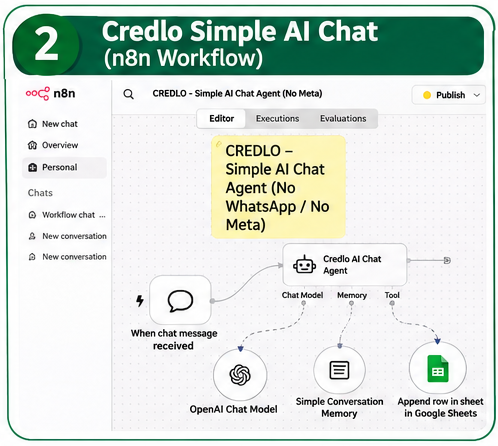
The screenshot shows the actual connection between the Chat Trigger, AI Agent, OpenAI Chat Model, Simple Conversation Memory, and Google Sheets Append Row tool.
5. Module Two: Credlo Duplicate Lead Detection
Preventing repeated customer registrations
Duplicate enquiries can make lead management difficult.
The same customer may return to the chat interface and submit another enquiry using the same mobile number.
To reduce repeated registrations, Credlo AI Lead Hunter uses Google Sheets as the reference database for duplicate checking.
How it works
The duplicate detection functionality is integrated into the AI Chat Agent through Google Sheets tools.
The process follows these steps:
- The customer provides a mobile number.
- The AI agent calls the Get row(s) in sheet tool.
- Google Sheets searches the Mobile Number column.
- If a matching record is found, the assistant does not intentionally create another lead.
- The customer is informed that their enquiry appears to be already registered.
- If no matching record exists, the assistant continues collecting the required details.
- After customer consent, the new lead is added using Append Row.
Duplicate detection logic
| Condition | System response |
|---|---|
| Existing mobile number found | Do not append another lead |
| No matching number found | Continue lead collection |
| Customer information incomplete | Continue asking for missing details |
| Customer has not given consent | Do not save the lead |
| Customer confirms and validation succeeds | Append the new lead |
Why mobile number matching?
The mobile number provides a practical identification field for customer enquiries.
However, the current implementation uses an exact mobile number lookup. Different number formats may affect matching.
For example, a number saved with an international country code may not match the same number stored without it.
Consistent mobile number formatting is therefore recommended.
Actual n8n implementation
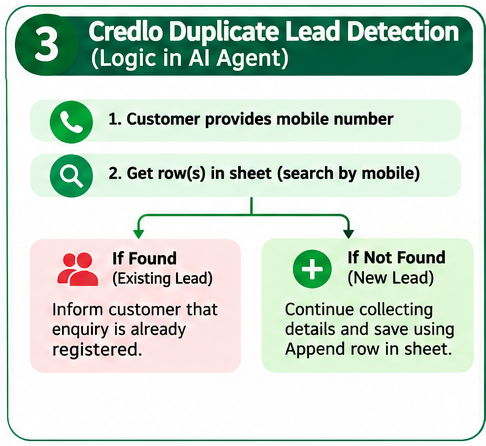
The supplied workflow JSON confirms the Get row(s) tool is configured to search the Mobile Number column and the Append Row tool is configured to save new leads.
6. Google Sheets Integration: Central Lead Management
Google Sheets is the common database used by the Credlo automation system.
The spreadsheet is named:
Credlo AI Lead Management
The main worksheet is:
Leads
Actual Append Row configuration
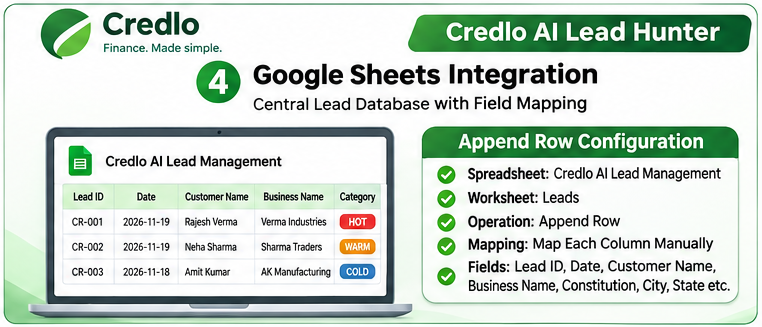
The supplied n8n screenshot confirms:
- Google Sheets OAuth2 credential.
- Spreadsheet: Credlo AI Lead Management.
- Worksheet: Leads.
- Operation: Append Row.
- Mapping mode: Map Each Column Manually.
- Lead ID field defined through the AI agent.
- Date generated using the Asia/Kolkata timezone.
- Customer Name, Business Name, Constitution, City, State, and other fields mapped for lead registration.
The workflow also maps fields such as:
- Lead Status
- Mobile Number
- Email Address
- Annual Turnover
- Existing Loan Details
- Contact Consent
- Lead Category
New lead records are configured with the status New.
Lead classification
Every lead is assigned one of three sales-priority categories.
HOT: Clear and urgent funding requirement, known loan amount and purpose, and agreement to be contacted.
WARM: Customer is interested, but some information is missing or the customer is evaluating options.
COLD: General enquiry without an established current funding requirement.
These categories are sales-priority indicators. They are not credit scores, eligibility decisions, or loan approval results.
7. Module Three: Credlo HOT Lead Alert
Automated email notification for high-priority enquiries
The HOT Lead Alert is a separate n8n workflow.
Its purpose is to identify newly added HOT leads and notify the Credlo team through Gmail.
Actual workflow architecture
The implemented workflow contains three nodes:
1. Google Sheets Trigger
Monitors the Credlo Leads worksheet for a newly added row.
The trigger event is Row Added.
2. IF Node
Checks the Lead Category field.
The condition identifies whether the new lead is classified as HOT.
3. Gmail – Send a Message
The True output connects to Gmail and sends an email notification.
Workflow sequence
Google Sheets Trigger → IF (Lead Category = HOT) → Gmail Send Message
If the lead is not HOT, the notification path is not executed.
Practical example
Suppose a manufacturing company requires urgent working capital.
The customer interacts with the Credlo AI assistant, provides the required details, and confirms permission to be contacted.
The assistant classifies the enquiry as HOT and saves it in Google Sheets.
The separate HOT Lead Alert workflow detects the new row, evaluates the category, and sends an email to the configured Credlo notification inbox.
This helps the team identify high-priority enquiries without repeatedly checking the spreadsheet.
Actual n8n implementation
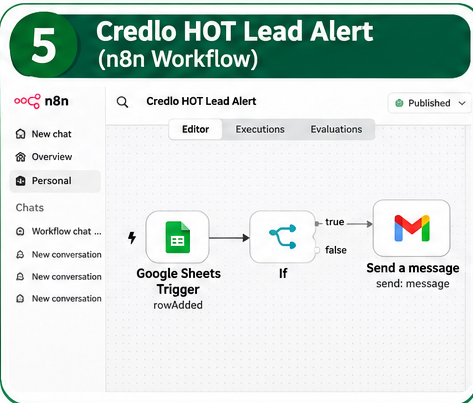
The screenshot shows the Google Sheets Trigger connected to an IF node and Gmail Send Message.
Notification channel: Gmail.
WhatsApp notifications are not included in the current implementation.
8. Module Four: Credlo Follow-up Reminder
Automated daily follow-up notifications
Customer follow-up is an important part of business finance operations.
A customer may be interested in funding but require additional time to provide documents or discuss the requirement.
The Follow-up Reminder workflow helps the team identify leads whose follow-up dates have arrived or passed.
Actual workflow architecture
The workflow contains four components.
1. Schedule Trigger
Configured to run daily at 9:00 AM.
2. Google Sheets Get Row(s)
Reads records from the Credlo Leads worksheet.
3. IF Node
Checks whether Next Follow-up Date exists and is today or earlier.
4. Gmail Send Message
Sends an email reminder when the condition is true.
Workflow sequence
Schedule Trigger → Get row(s) in sheet → IF (Follow-up Due) → Gmail Send Message
Information included in the reminder
The email contains:
- Lead ID
- Customer Name
- Business Name
- Mobile Number
- Email Address
- Loan Amount
- Lead Category
- Follow-up Status
- Next Follow-up Date
- Follow-up Notes
- Contacted By
The notification asks the team to contact the customer and update the follow-up information in Credlo Lead Management.
Practical example
A customer has requested a business loan and the Credlo team schedules a follow-up for the next day.
The team enters the Next Follow-up Date in Google Sheets.
When the scheduled workflow runs at 9:00 AM, it checks the date.
If the follow-up is due or overdue, the workflow sends an email reminder.
This makes the follow-up process more organised.
Actual n8n implementation
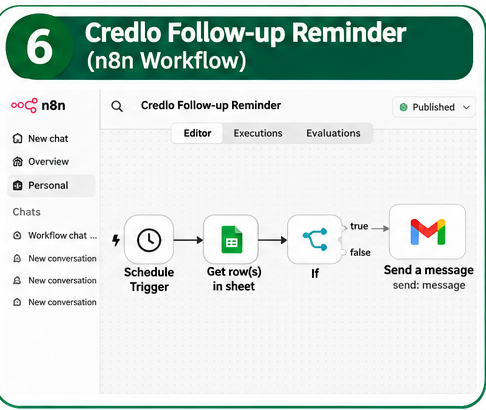
The screenshot shows Schedule Trigger, Get row(s) in sheet, IF, and Gmail Send Message connected in sequence.
Important: The workflow sends reminders; it does not automatically call customers, send WhatsApp messages, or update follow-up status.
9. Complete Business Process
The four modules work together through the central Google Sheets database.
| Stage | Automation | Result |
|---|---|---|
| 1 | Simple AI Chat | Customer enquiry collected |
| 2 | Duplicate Detection | Existing mobile number checked |
| 3 | Google Sheets | New lead registered after consent |
| 4 | Lead Classification | HOT, WARM, or COLD |
| 5 | HOT Lead Alert | Gmail notification for new HOT leads |
| 6 | Follow-up Reminder | Gmail reminder for due or overdue follow-ups |
This creates a structured process for managing business finance enquiries.
10. Step-by-Step Implementation Guide
The following sequence explains how a similar system can be configured in n8n Cloud.
Step 1: Create the Google Sheets database
Create a spreadsheet named Credlo AI Lead Management.
Create a worksheet named Leads.
Add all required columns, including the additional follow-up fields.
Column names must match the fields used in the n8n nodes.
Step 2: Connect Google Sheets
Open the Google Sheets nodes in n8n.
Configure Google Sheets OAuth2 credentials and authorise the appropriate Google account.
Select the spreadsheet and Leads worksheet.
Step 3: Configure the AI Chat workflow
Import the Simple AI Chat and Duplicate Lead Detection JSON.
Configure the OpenAI Chat Model credential.
Check all AI Agent connections:
- Chat Trigger
- OpenAI Chat Model
- Simple Conversation Memory
- Google Sheets Get Row(s)
- Google Sheets Append Row
Save and test the workflow.
Step 4: Test duplicate detection
Register a test enquiry using a mobile number.
Start another conversation using the same number.
Check whether the existing record is returned and whether another record is prevented.
Then test a new mobile number.
Step 5: Configure HOT Lead Alert
Create a separate workflow.
Add:
- Google Sheets Trigger
- IF
- Gmail Send Message
Configure the trigger to monitor newly added rows in the Leads worksheet.
Set the IF condition to check whether Lead Category equals HOT.
Connect the True output to Gmail.
Configure the notification recipient, subject, and email body.
Step 6: Configure Follow-up Reminder
Create another separate workflow.
Add:
- Schedule Trigger
- Google Sheets Get Row(s)
- IF
- Gmail Send Message
Set the daily schedule to 9:00 AM.
Configure the date condition to identify records with a Next Follow-up Date that exists and is today or earlier.
Connect the True output to Gmail.
Step 7: Test all modules
Before activating the system for regular use, test:
- Hindi, English, and Hinglish conversations.
- New lead registration.
- Duplicate mobile numbers.
- Customer consent.
- HOT, WARM, and COLD classifications.
- HOT email alerts.
- Follow-up dates due today.
- Overdue follow-up dates.
- Missing follow-up dates.
Activate each workflow after verifying its configuration.
11. Business Benefits
Faster enquiry collection
The AI assistant can collect customer information conversationally.
Better lead organisation
Google Sheets provides a central location for reviewing customer enquiries.
Reduced duplicate entries
Mobile-number-based lookup helps prevent repeated lead registrations.
Better sales prioritisation
HOT, WARM, and COLD categories help the team organise its attention.
Faster identification of urgent enquiries
Gmail notifications help the team identify newly registered HOT leads.
More organised follow-ups
Daily reminders help reduce the possibility of missing scheduled customer follow-ups.
Practical automation costs
The system uses existing automation and cloud services instead of requiring a complete custom CRM application at the beginning.
Actual costs depend on the selected subscriptions and usage.
12. Practical Business Use Cases
Manufacturing businesses
A manufacturer needs working capital for raw materials and operations. The AI assistant collects the funding requirement and registers the enquiry for the Credlo team.
Trading businesses
A trading company requires funds for inventory and supplier payments. The assistant records the customer’s business and funding information.
Machinery financing
A company wants financing for machinery. The enquiry is recorded so that a Credlo advisor can review the requirement and confirm the appropriate documentation.
Existing customer follow-ups
A customer has already discussed a funding requirement. The team records a follow-up date, and the reminder workflow sends an email when the date becomes due.
13. Current System Limitations
Transparency is important when documenting a technical implementation.
The current Credlo AI Lead Hunter version has the following limitations:
- No WhatsApp integration: The AI assistant is currently a browser-based n8n chat interface. It is not connected to WhatsApp or Meta.
- Email-based notifications: HOT alerts and follow-up reminders use Gmail.
- Exact mobile number lookup: Different mobile number formats may affect duplicate matching.
- Manual follow-up: The system sends reminders but does not automatically call customers.
- Manual follow-up updates: Team members must update follow-up information in Google Sheets.
- Google Sheets dependency: The automation depends on correct spreadsheet structure, credentials, and column names.
- No automated lending decision: Lead categories do not indicate loan eligibility or approval.
- Workflow monitoring: n8n executions and service credentials need to be monitored to identify failures.
The system should be tested and monitored before being relied upon for regular business operations.
14. Future Development Possibilities
The current implementation provides a foundation for further development.
Potential enhancements include:
- A dedicated Credlo lead management dashboard.
- Advanced sales reporting.
- Improved duplicate matching through number normalisation.
- More detailed follow-up management.
- Supported WhatsApp Business API integration.
- Team-wise lead assignment.
- CRM integration.
- Advanced business analytics.
- Improved mobile chat experience.
These are future possibilities, not features claimed to be operational in the current version.
15. Why Credlo Built This System
At Credlo, we believe that technology should simplify business finance operations.
Customer enquiries deserve timely attention. Sales teams need organised information. Follow-ups should not depend entirely on memory or manual spreadsheet checking.
Credlo AI Lead Hunter was developed with this practical objective.
By combining AI conversations, duplicate detection, centralised lead storage, priority-based notifications, and scheduled reminders, we created a modular automation system that supports the day-to-day lead management process.
The guiding approach is straightforward:
Capture the enquiry. Validate the lead. Prioritise the opportunity. Follow up on time.
Conclusion
Credlo AI Lead Hunter demonstrates how AI and workflow automation can support loan lead generation and management.
Using n8n, OpenAI, Google Sheets, and Gmail, the system connects four important functions:
- AI-powered customer enquiry collection.
- Mobile-number-based duplicate detection.
- Automated HOT lead email alerts.
- Scheduled follow-up reminders.
The result is a practical, modular automation architecture that can help business finance teams manage customer enquiries in a more structured way.
Rather than starting with a complicated CRM platform, businesses can begin with a focused automation solution and expand it as their operational requirements grow.
Credlo AI Lead Hunter – Smarter Lead Management. Better Follow-ups. More Organised Business Finance Operations.
For more information about Credlo’s business funding solutions, visit:
Website: https://credlo.in/